

T9 Pro 8.9" Integrated Dashboard Display for Tesla Model 3 Highland & Model Y Juniper , Wireless CarPlay/Android Auto, Ambient LED, OTA- Saunyoto
Estimate delivery times: 7-20 days (International)
4-8 days (United States).
Return within 30 days of purchase. Duties & taxes are non-refundable.
Guarantee Safe Checkout
T9 Pro 8.9" Integrated Dashboard Display for Tesla Model 3 Highland & Model Y Juniper , Wireless CarPlay/Android Auto, Ambient LED, OTA- Saunyoto
Description
⚠️ IMPORTANT NOTICE FOR 2026 MODEL Y OWNERS Due to recent Tesla hardware updates, 2026 Model Y configurations require a newly engineered wiring harness for full compatibility. Please note that all orders for the 2026 Model Y will experience an estimated 15-day shipping delay as these custom harnesses complete production.
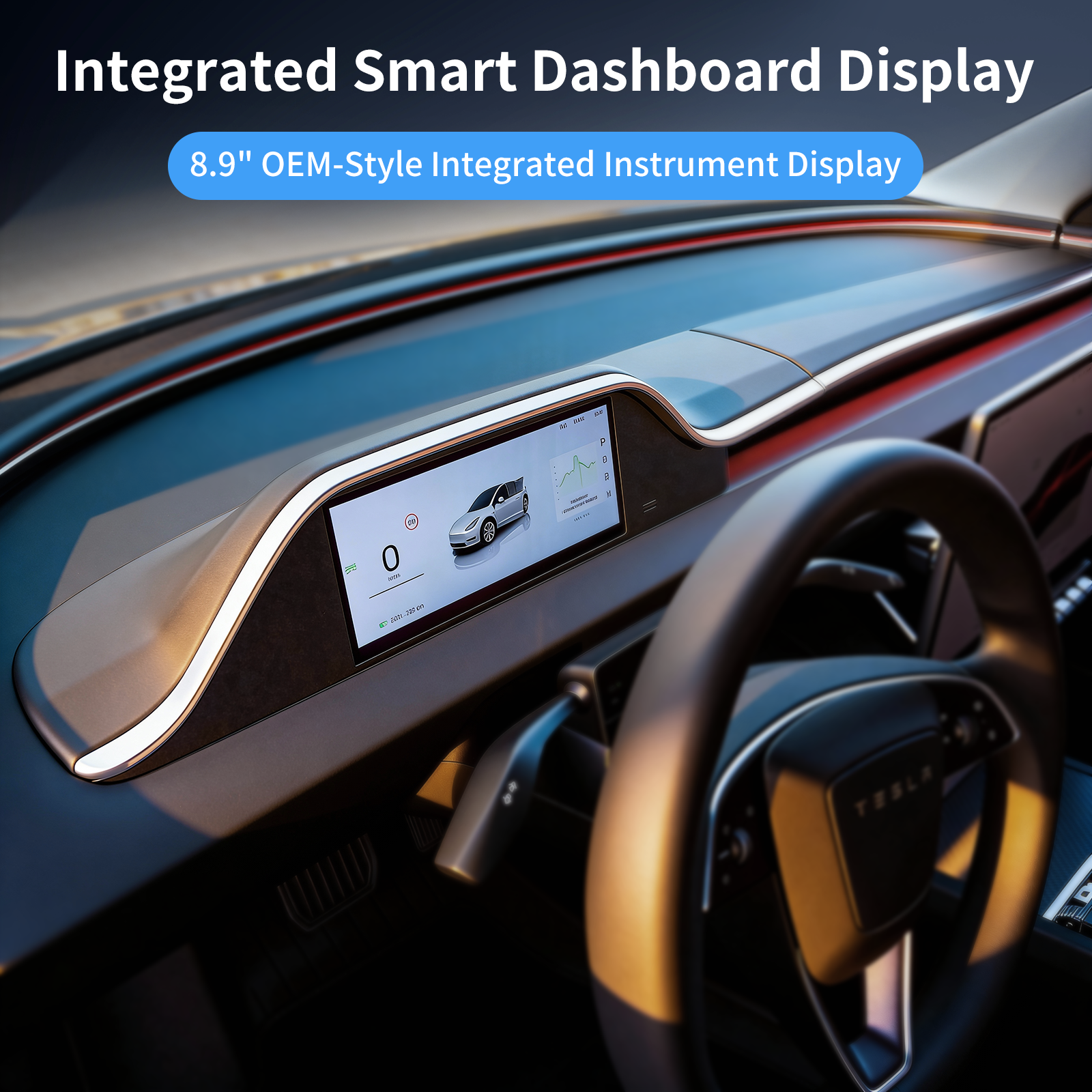
Saunyoto Integrated Dashboard Display with Ambient Lighting – 8.9" OEM-Style Smart Instrument Cluster for Tesla Model 3 Highland & Model Y Juniper
Upgrade your Tesla interior with this all-in-one 8.9-inch integrated dashboard display, featuring a stunning high-resolution screen, laser-engraved ambient lighting, and full compatibility with steering wheel controls and wireless CarPlay/Android Auto/HUAWEI HiCar. Designed to match the original OEM look while adding premium functionality and driving safety.
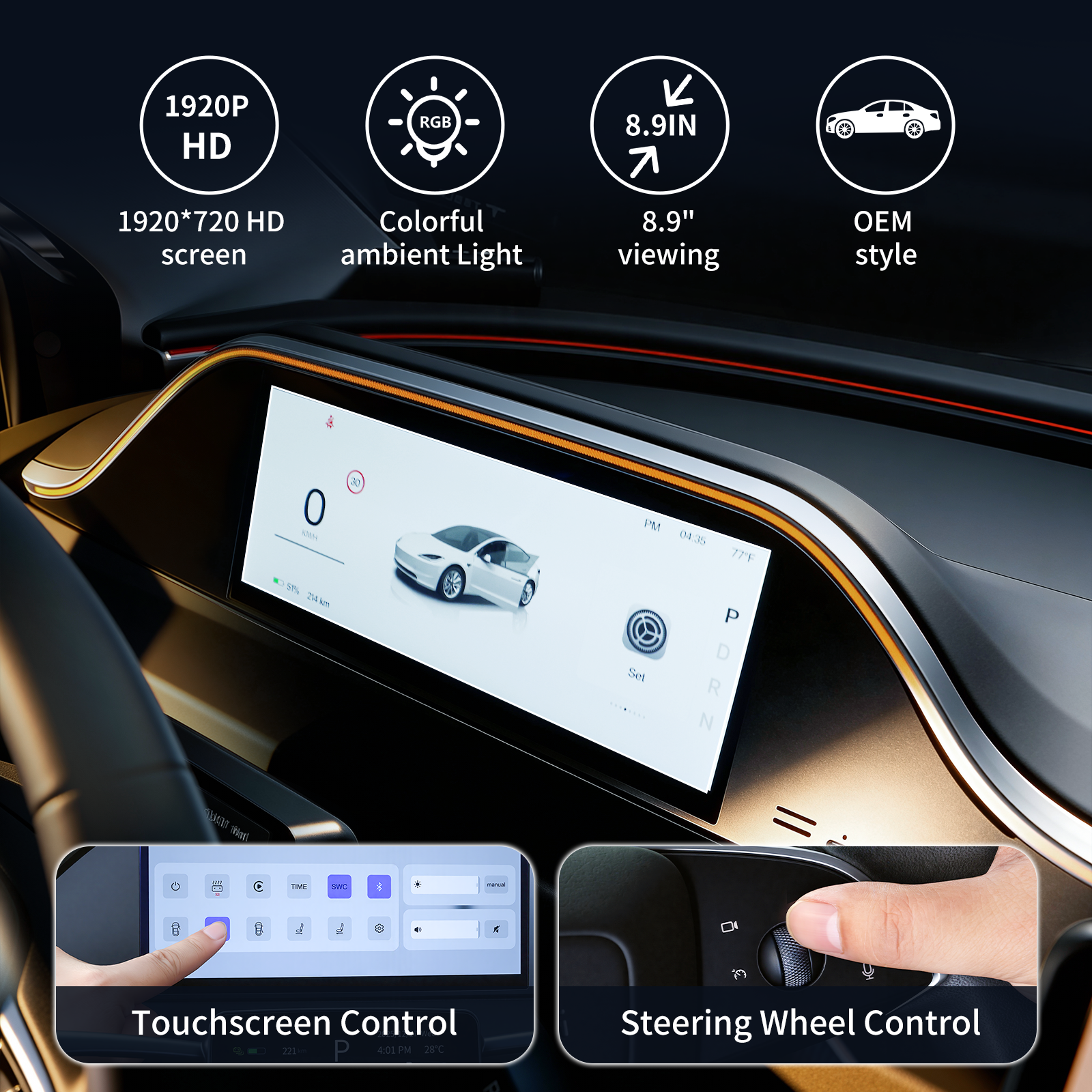
OEM-Style Integrated Design-Crafted to blend seamlessly with the Model 3 Highland and Model Y Juniper interior. The display delivers clearer, more vivid visuals than the original screen and offers two customizable UI themes.
Laser-Engraved Ambient Lighting-Equipped with precision-cut ambient light channels for soft, uniform illumination. Ambient lights synchronize with the vehicle’s built-in lighting system and support multiple color options.
Advanced Linux System + OTA Upgrades-Powered by a high-performance Linux operating system for smooth, stable operation. Supports OTA wireless firmware upgrades to keep your system always up to date.
Wireless CarPlay, Android Auto & HUAWEI HiCar-Connect via Wi-Fi or Bluetooth and access your essential apps, navigation, music, calls, and messages directly on the display—no cables required.
Real-Time Driving Data Sync
- Immediate synchronization of key vehicle information:
- Speed, gear, turn signals
- Brake indicator, temperature
- Remaining battery
- Lane and blind spot warnings
- Seatbelt and driver attention reminders
Optimal Airflow Retained
Designed with the original dual air-duct structure to maintain smooth, gentle airflow—just like the factory setup.
Steering Wheel Control Support
Fully compatible with OEM steering wheel buttons. Swipe or scroll to change interfaces without taking your hands off the wheel.
Non-Destructive Installation
Plug-and-play design with no cutting, drilling, or software modifications required. Safe for warranty and fully reversible.
Specifications
Product Name: Integrated Dashboard Display with Ambient Lighting
Applicable Models:
-Tesla Model 3 Highland (2024–Present)
-Tesla Model Y Juniper (2025–Present)
-Compatible with Left-Hand Drive
-Default with bottom air vent design
-Resolution: 1920 × 720
-Screen Size: 8.9 inches
-Dimensions: 50.3" (L) × 6.0" (W) × 4.5" (H)
-Operating System: Advanced Linux
-Firmware Upgrade: OTA Wireless Update
-Languages: English, Simplified Chinese, Traditional Chinese, Spanish, German, Japanese, Thai, Arabic, and more
-Car Connectivity: Wireless Apple CarPlay, Android Auto, HUAWEI HiCar
-Audio Output: Independent speakers or vehicle audio system
-Driving Information Displayed: Lane turns, lights, gear, speed, battery level, etc.
-Driving Safety Alerts: Seat belt reminder, speech zone warning, hands-off alert for Autopilot, and more
Package Contents
Integrated Dashboard Display with Ambient Lighting *1
Pry Tool *1
Installation Instruction *1
Warranty Card *1
Review Video
Additional Information
| Car Model |
Model 3 Highland (2024+) & Model Y Juniper (2025) 【LHD】, Model Y Juniper 2026 【LHD】 |
|---|---|
| With Front Camera |
Yes, No |
Return Policies
Return & Refund Policy
This return policy applies only to items purchased through saunyoto.com.
We value your satisfaction and are committed to providing high-quality products and support. If you are not completely satisfied with your purchase, we are here to help—please follow the guidelines below.
General Return Guidelines
-
Customized Products:
For customized products, once production has started, returns or refunds are not accepted unless there is a quality issue. -
Return Timeframe
-
Returns or exchanges are accepted within 30 days from the date of purchase.
-
Orders beyond 30 days are not eligible for return or exchange.
-
-
Product Condition
To be eligible for a return, the product must meet the following conditions:-
The product must be unused, in original condition, and in its original packaging.
-
A receipt or proof of purchase is required.
-
-
Non-returnable Items
- Customized products
- Free gifts or promotional items
- Products priced under $100 are final sale and non-returnable
Return Process
If your return request is approved:
- We will provide a return label and return address
- Please do not return items without prior authorization — unauthorized returns may be rejected
- Due to the size and value of our products, return shipping costs may vary depending on your location and the shipping carrier.
-
Estimated return shipping costs typically range between $50 – $200 USD.
We recommend customers confirm the shipping cost with their selected carrier before returning the item.
Return Address
Refund Information
- Customers are responsible for return shipping costs and any applicable duties or handling fees
- Original shipping fees are non-refundable
- Return shipping costs may be deducted from the refund if applicable
All returned items must:
- Be in original condition
- Include original packaging, invoice, receipt, and accessories (if applicable)
- Pass inspection by our quality assurance team
Items Not Eligible for Return
Due to the nature of certain products, some items may not be eligible for return. However, if you receive a defective or damaged product, please contact our after-sales support team immediately for assistance.
If the return is caused by the consumer, the consumer will be responsible for the shipping fee. The specific fee depends on the shipping carrier chosen.
If the return is due to our fault (damaged or incorrect goods), the consumer is not required to bear the shipping fee.
Service & Price Adjustments
- Product prices are subject to change without prior notice
- No price adjustment will be provided after 7 days from the order date
- We reserve the right to modify or discontinue products or services at any time without notice
Order Cancellation
Customers may request to cancel their order within 24 hours after placing the order.
Once the order has been processed or shipped, it cannot be canceled.
If the cancellation request is made before shipment and within the allowed cancellation period, a full refund will be issued.
Order Processing Time
Orders are typically processed within 1–7 business days after payment confirmation.
1-Year Limited Warranty
All products are covered by a 1-year limited warranty against manufacturing defects.
Please note: This warranty does not cover normal wear and tear or damage caused by improper installation.
Recommended for You